General Ledger Process Flow
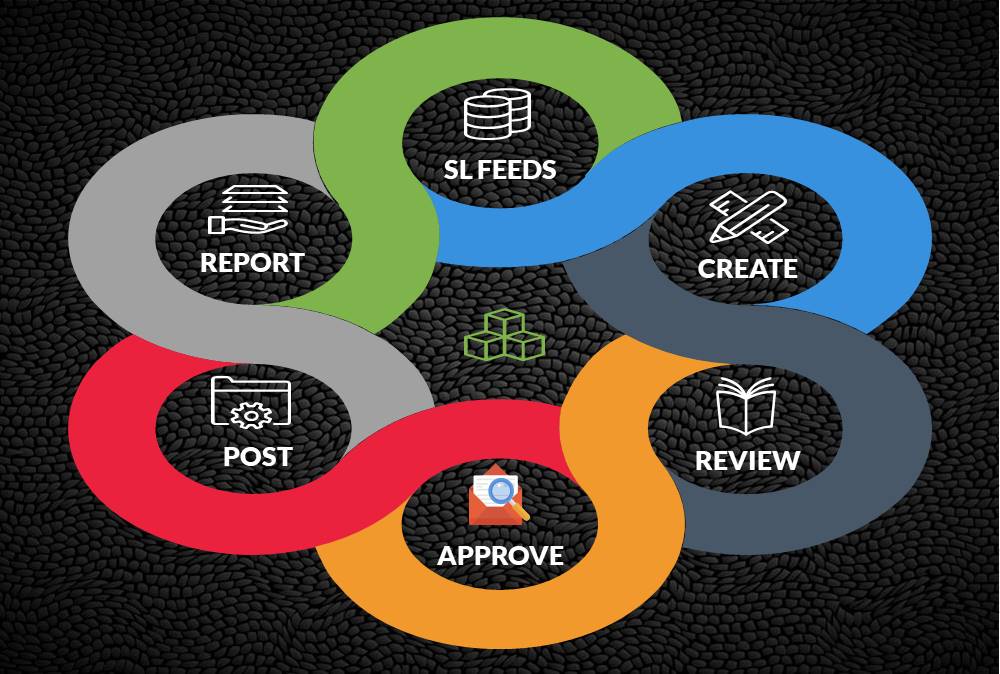
In this article, we will explain the general Ledger journal processing flow from entering journals to running the final financial reports. Understand the generic general ledger process flow as it happens in automated ERP systems. The accounting cycle explains the flow of converting raw accounting data to financial information whereas general ledger process flow explains how journals flow in the system.
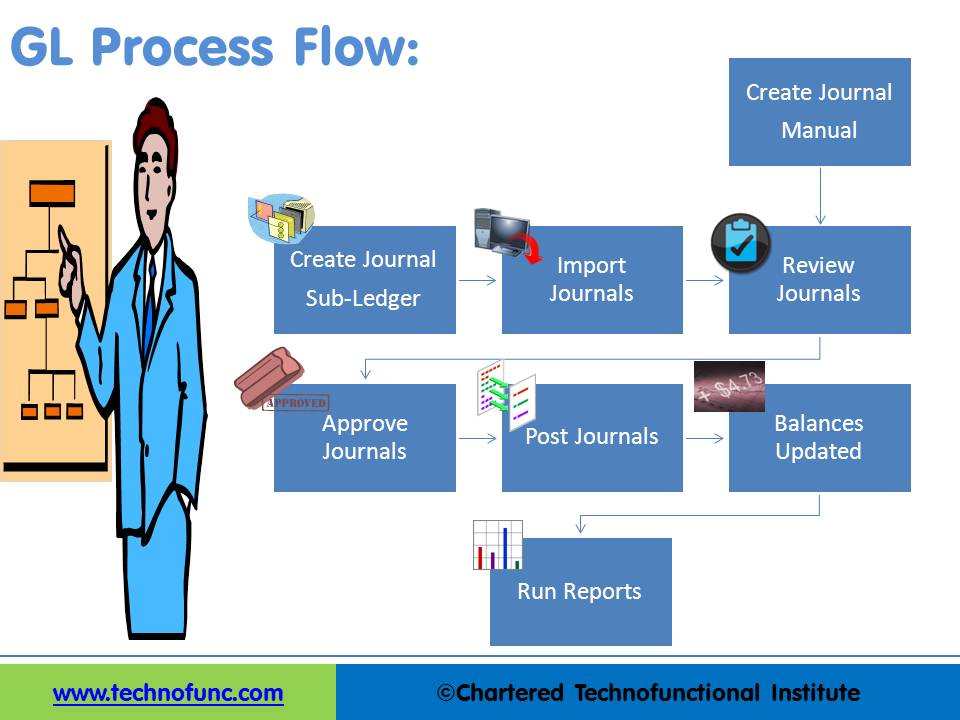
GL process flow is a five-step process from recording the transactions in the system to finally running the reports containing financial data out of the system. The input for GL Process Flow is the raw accounting data and the output is the accounting reports that can be used to provide various levels of financial information.
The steps in the general ledger process flow are:
- Step1. Create Journal or Import Journal from Sub‐Ledger
- Step2: Review Journals
- Step3: Approve Journals
- Step4: Journals Posting
- Step5: Run Financial Reports
Step 1: Create Journal or Import Journal from Sub‐Ledger:
Accounting Journals can be created directly in General Ledger. They can also be created in subsidiary ledgers and can then be imported to General Ledger. In the previous lesson, we saw some examples of commonly used subsidiary ledgers. Companies extensively use modules like accounts receivable, accounts payable, inventory, assets, projects, and cash management subsidiary ledgers. Data created in these sub-systems need to be imported to the general ledger for further processing, The accounting lines from sub-ledgers can be imported in summarized form or detailed form.
General Ledger also allows users to directly add transactions in the GL. In that case, you need to follow the accounting principles and the steps explained in the accounting process. At this stage, the journals are entered into the system and available for further processing, but they have not impacted the general ledger account balances yet.
Step 2: Review Journals:
Once the Journal is available in the General Ledger System you can query the journals that have been created. While reviewing the journal, you can make edits/corrections if required.
You might need to make some adjustments to the journals coming from other sources if you want to change the accounts or amounts that are coming from the sub-systems. Review functionality gives the capability to query the journals based on different parameters and also make edits if required.
Step 3: Approve Journals:
Accounting prudence requires that all financial transactions should be reviewed by someone other than the person creating the transaction. Approval ensures the validity and correctness of the transaction. The segregation of the Duties concept requires that the responsibility for related operations should be divided among two or more persons. This decreases the possibility of errors and fraud.
In this step, the system will validate the journal batch, determine if approval is required, and submit the batch to approvers (if required), then notifies appropriate individuals of the approval results. Email notifications can be sent to the approvers using the system and they can review and approve the journals. This step is generally optional and many organizations skip this step by putting additional controls in the process. If this feature is enabled then the journal cannot be posted unless it has been approved.
Step 4: Journals Posting:
An important feature of the general ledger is the "Balance" column, which keeps a running balance for each of the accounts pertaining to which transactions are happening. The transactional data captured through journals in the previous steps is transferred periodically to the columns in the general ledger. Journals posting is a process of updating the database with the amounts.
The volume of transactions carried out by a business will indicate how often to post. A busier company may post daily, while other companies may post weekly or monthly. Periodic postings is required to ensure balances for accounts are current, so the business has the up-to-date financial information it needs to make quick decisions. All transactions must be posted to the ledger at the end of an accounting period. Once the Journals are posted users can query for updated account balances using the account inquiry functions.
Journals Balances Updated: The posting process updates the journal balances. You can inquiry about the account balances in General Ledger for all posted transactions.
Step 5: Run Financial Reports:
One way to determine the financial progress of any organization is to look at the profit gained by a business. Once you have the account balances and transactional data available in the system they need to be formatted to meaningful information that can help users understand the financial history as well as equip them to make informed decisions. To enable these business users to need many types of financial reports.
The next step in the general ledger process is to generate these useful reports and the most common reports run from General Ledger are Transactions Register and Trial Balance Report. ERPs come with a large number of seeded reports as well as with tools to define user-specified reports.
Given above is the generic general ledger process. Some systems may have slight variations to the above process, but the underlying concepts remain more or less the same!
Related Links
You May Also Like
-
GL - Understanding Chart of Accounts
A chart of accounts (COA) is a list of the accounts used by a business entity to record and categorize financial transactions. COA has transitioned from the legacy accounts, capturing just the natural account, to modern-day multidimensional COA structures capturing all accounting dimensions pertaining to underlying data enabling a granular level of reporting. Learn more about the role of COA in modern accounting systems.
-
Five Core General Ledger Accounts
Typically, the accounts of the general ledger are sorted into five categories within a chart of accounts. Double-entry accounting uses five and only five account types to record all the transactions that can possibly be recorded in any accounting system. These five accounts are the basis for any accounting system, whether it is a manual or an automated accounting system. These five categories are assets, liabilities, owner's equity, revenue, and expenses.
-
Introduction to Organizational Structures
Organizations are systems of some interacting components. Levitt (1965) sets out a basic framework for understanding organizations. This framework emphasizes four major internal components such as: task, people, technology, and structure. The task of the organization is its mission, purpose or goal for existence. The people are the human resources of the organization.
-

Global Business Services (GBS) Model
Global business services (GBS) is an integrated, scalable, and mature version of the shared services model. Global Business Services Model is a result of shared services maturing and evolving on a global scale. It is represented by the growth and maturity of the Shared services to better service the global corporations they support.
-
Multi Currency - Functional & Foriegn
Currency is the generally accepted form of money that is issued by a government and circulated within an economy. Accountants use different terms in the context of currency such as functional currency, accounting currency, foreign currency, and transactional currency. Are they the same or different and why we have so many terms? Read this article to learn currency concepts.
-

Divisional Organizational Structures
The divisional structure or product structure consists of self-contained divisions. A division is a collection of functions which produce a product. It also utilizes a plan to compete and operate as a separate business or profit center. Divisional structure is based on external or internal parameters like product /customer segment/ geographical location etc.
-
GL - Journal Posting and Balances
In this tutorial, we will explain what we mean by the posting process and what are the major differences between the posting process in the manual accounting system compared to the automated accounting systems and ERPs. This article also explains how posting also happens in subsidiary ledgers and subsequently that information is again posted to the general ledger.
-

Shared Services is the centralization of service offering at one part of an organization or group sharing funding and resourcing. The providing department effectively becomes an internal service provider. The key is the idea of 'sharing' within an organization or group.
-

Legal Structures for Multinational Companies
A multinational company generally has offices and/or factories in different countries and a centralized head office where they coordinate global management. A multinational company (MNC)is a corporate organization that owns or controls the production of goods or services in at least one country other than its home country.
-

The sole trader organization (also called proprietorship) is the oldest form of organization and the most common form of organization for small businesses even today. In a proprietorship the enterprise is owned and controlled only by one person. This form is one of the most popular forms because of the advantages it offers. It is the simplest and easiest to form.
